Model Context Protocol (MCP): A Protocol Layer for Tool-Augmented LLMs
Home Sankar Reddy V
1. Introduction: Why We Need MCP?
The rise of LLM agents (GPT, Copilot, LangChain, Autogen)
Why traditional SDKs and APIs don’t scale for tool invocation
Enter MCP: a lightweight, model-native protocol layer for agents to discover and invoke tools
Think of it as the “OpenAPI for AI tools”
Notes:
When you call a REST API, you send a payload and expect a result. But what happens when the LLM itself is the one choosing which API to call? Traditional SDKs don’t expose tools in a way models can understand. MCP fixes this.
2. What Is MCP?
MCP = Model Context Protocol
Created to allow LLM agents to discover, reason about, and invoke tools via structured metadata
Designed to be stateless, language-agnostic, and LLM-friendly
Not a product — it’s a pattern + protocol spec
3. Core Concepts of MCP
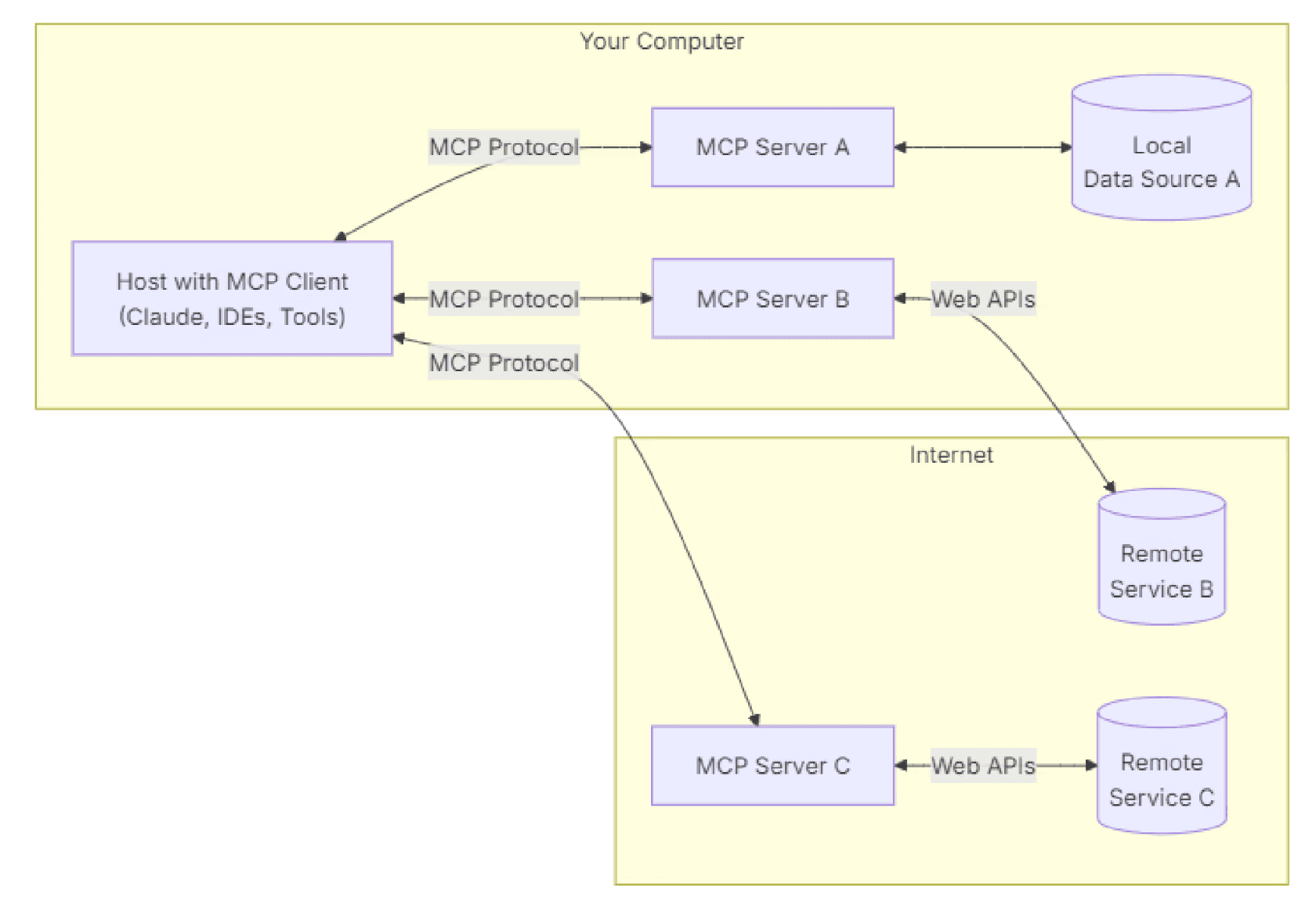
MCP Server: Hosts tools (business logic), exposes metadata
MCP Client: The agent or orchestrator (e.g., GPT) that calls tools
Tools defined with metadata: name, description, input schema, output schema
LLM decides which tool to invoke, not the server
The server just exposes functionality, nothing more
Clarify:
Who decides which tool to call?
The LLM client decides, based on its goal and the metadata. The server just responds.
4. How MCP Works — Lifecycle
End-to-end lifecycle :
Example JSON (Call Format):
5. Minimal .NET Server Example
Basic example:
Your tool is now discoverable and callable by agents like GPT-4.
6. MCP vs Traditional Approaches
Why not just use APIs or SDKs?
Traditional APIs and SDKs weren’t built for LLM agents. They’re great for human developers, but fall short when used by autonomous models.
Here’s how MCP differs:
SDKs are tightly coupled
Traditional SDKs are compiled into your app and require language-specific bindings. MCP is protocol-based and language-agnostic — the server and client are loosely coupled.
REST/GRPC are human-defined
APIs are built with human consumers in mind — the docs, routes, and auth flows are meant for developers. MCP tools are exposed with machine-readable metadata so that LLMs can understand and invoke them autonomously.
Developer triggers the logic
In APIs/SDKs, the developer chooses when and how to call a function. With MCP, the LLM (client) decides which tool to use, when to invoke it, and how to handle the result.Designed for human interaction
REST and SDKs are perfect for UIs and CLI tools. MCP is designed for agent-native orchestration, enabling autonomous systems to use tools intelligently.Bottom Line:
MCP is for tools that LLMs discover and invoke — not tools hand-wired by human developers.
7. Real-World Use Cases
GitHub Copilot → calling dev tools via MCP
LangChain agents → discover & invoke tools
Autonomous agents → planning workflows across MCP servers
Developer environments (e.g. VS Code) → surface tools dynamically
8. MCP Client Responsibilities
What does the LLM client do?
Fetch tool metadata
Analyze tool descriptions + input schema
Choose the best tool for the job
Build JSON payload to invoke it
Interpret the result and continue reasoning
Prompt Example:
“You are an assistant with access to 3 tools: summarizeText, translateText, and fetchWeather. Your goal is to summarize input text before sending it via email. Use the most appropriate tool.”
9. Security, Observability & Governance
Enterprise readiness
Add API key protection, OAuth scopes
Allow/deny tool access per client or org
Add tracing and logging per invocation
Rate limiting / throttling
Wrap tool logic in sandbox environments
10. Limitations and Gotchas
While MCP offers powerful capabilities, it’s not without trade-offs. Here’s what to watch out for:
Stateless by Default
MCP doesn’t manage memory or workflow state. If your agent needs context or multi-step memory, you’ll need to handle that on the client or use an external memory layer.
Client-Side Validation Only
The server expects the client (LLM or agent) to send valid input. If the client sends malformed or incomplete JSON, the tool call will fail. There’s no automatic fallback or retry logic.
Over-Discovery Can Confuse Agents
If too many tools are exposed to the client, LLMs can become indecisive or make suboptimal tool selections. Keeping the toolset lean and well-documented improves effectiveness.
No Built-In Authentication or Security
MCP exposes metadata and tool endpoints but doesn’t define a security model. You must implement authentication, authorization, and rate limiting at the server layer.
Requires Smart LLM Clients
The LLM client must support tool calling, such as OpenAI’s function calling or the tools API. Basic models without this capability can’t make use of MCP-based tool discovery or invocation.
Pro Tip: Use MCP in environments where you control both the client (LLM/agent) and the server (tools). This lets you optimize for trust, observability, and clear tool communication.
11. MCP vs Semantic Kernel
Both MCP and Semantic Kernel (SK) aim to empower LLM-based systems — but they approach the problem from very different angles.
Here’s how they compare:
Paradigm
MCP: Protocol-first — defines a standard for exposing tools via a discoverable, machine-readable API.
Semantic Kernel: SDK/library-first — designed for embedding orchestration into application code.
Planning
MCP: Planning happens externally — the LLM (like GPT) decides which tool to use.
Semantic Kernel: Planning is done in-process — using planners like ActionPlanner inside your app.
Execution
MCP: Tools are hosted on a server and invoked via network calls.
Semantic Kernel: Skills/functions are local methods or plugins invoked in memory.
LLM-Native
MCP: Built for LLMs — aligns with OpenAI’s function-calling and tools API.
Semantic Kernel: LLM-aware, but optional — you can use it without LLMs.
Can They Work Together?
Yes!
MCP can wrap Semantic Kernel skills as server-hosted tools, exposing them for discovery by LLMs. This allows a clean separation of orchestration (MCP) and execution logic (SK).
Think of it like this:
MCP is the OpenAPI for LLMs — a protocol to describe and expose tools.
Semantic Kernel is the runtime — a framework to implement skills and planners.
Together, they make LLM agents smarter and more operational.
12. When (and Who) Should Use MCP
Use MCP if you’re building:
Agent frameworks (multi-agent coordination)
Copilot-like UIs (developer environments, IDEs)
SaaS tools for LLM orchestration
DevEx platforms with intelligent CLI / UI agents
Ideal for:
Agent developers
Dev tools engineers
Platform architects
Enterprise AI teams
Conclusion
MCP is not a replacement for clean code or SDKs.
It’s a protocol that allows agents to reason about and use those tools.
It’s lightweight
It’s powerful
It lets LLMs act like intelligent users of your APIs