Blazor Basics: Understanding Components, Hosting Models, and More
Sreyanth
What is Blazor?
Blazor is a .NET front-end framework that allows you to build web applications using C# and Razor components. It’s a powerful tool that enables you to create fast, interactive, and scalable web applications. Unlike other JavaScript-based frameworks, Blazor allows you to write rich web applications entirely in C#, eliminating the need to switch between languages for backend and frontend development. It combines the power of .NET with the simplicity of modern web development, without relying on JavaScript.
Blazor’s Name:
A mix of “Browser” and “Razor,” reflecting its ability to run C# code in the browser replacing traditional server-side rendering with a client-side approach.
What are Blazor Components?
In Blazor, a component is a piece of UI, such as a page, table, or form. Components are .NET C# classes built into .NET assemblies that:
Define flexible UI rendering logic
Handle user events
It can be nested and reused
Can be shared and distributed as Razor class libraries or NuGet packages
Components are usually written in Razor files (.razor extension), which allows you to combine HTML with C# code.
Razor Syntax
Razor syntax is a way to combine HTML with C# code in the same file. It might look unclear at first, but it’s quite simple.
Here’s an example:
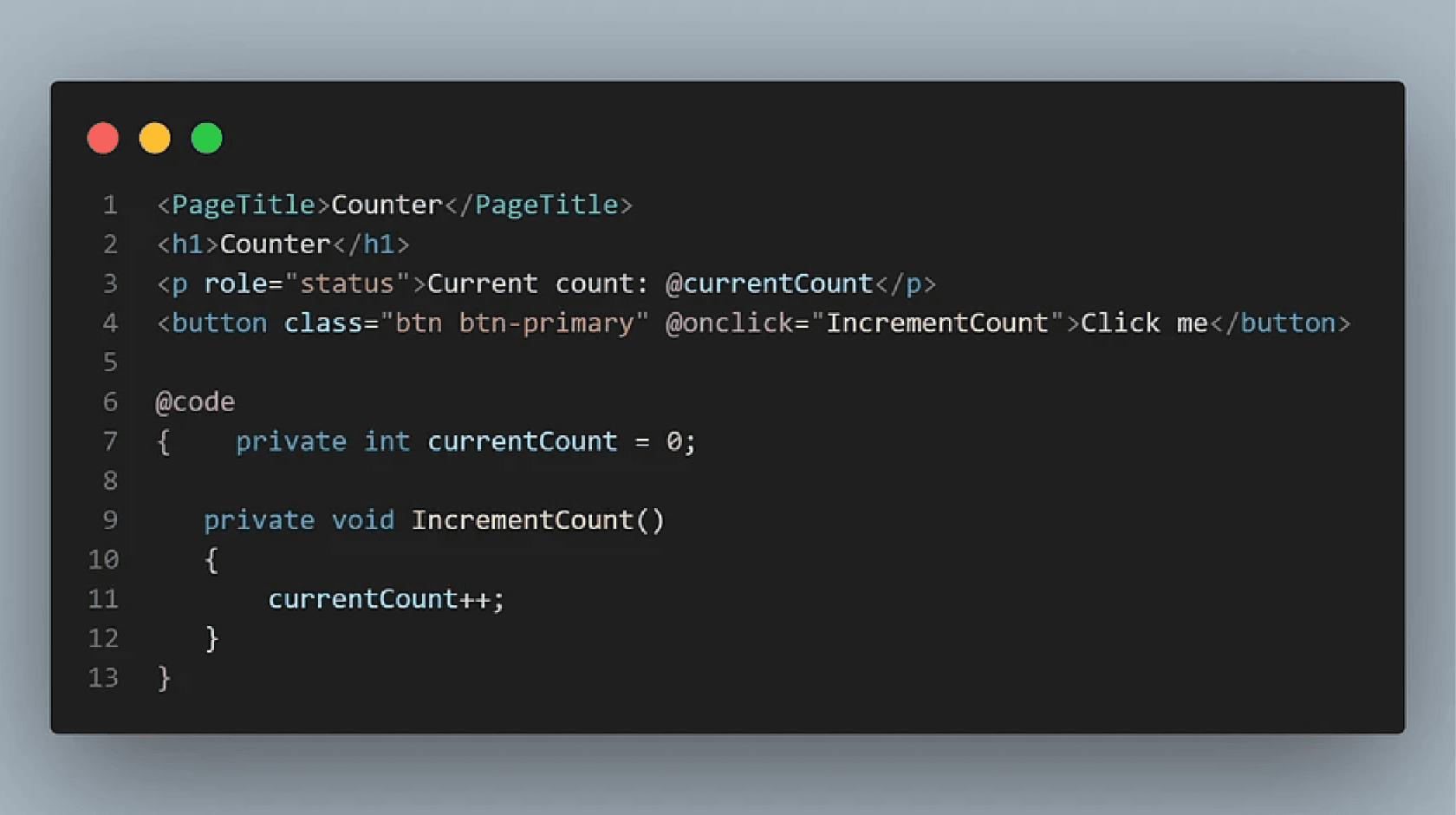
In this example, the @code block allows you to write C# code inside the HTML markup page.
Supported Browsers
Blazor supports the following browsers:
Apple Safari
Google Chrome
Microsoft Edge
Mozilla Firefox
Blazor Hosting Models
Blazor offers different hosting models, each suited for different application needs. Understanding these models is crucial for choosing the right one for your project.
Blazor WebAssembly vs Blazor Hybrid
There are two main types of Blazor applications:
Blazor WebAssembly
Executes C# code directly in the browser using WebAssembly
Allows you to use the entire .NET ecosystem, including libraries and tools
Creates responsive web designs using Razor components
Cross-platform and doesn’t require server round trips
Blazor Hybrid
Combines the power of Blazor with native client frameworks
Allows you to build powerful cross-platform desktop and mobile applications using C# and Razor components
Used for desktop and mobile applications
How Does Blazor Work?
To understand how Blazor works, it is important to know the two versions of Blazor: Blazor Server and Blazor WebAssembly.
1. Blazor Server
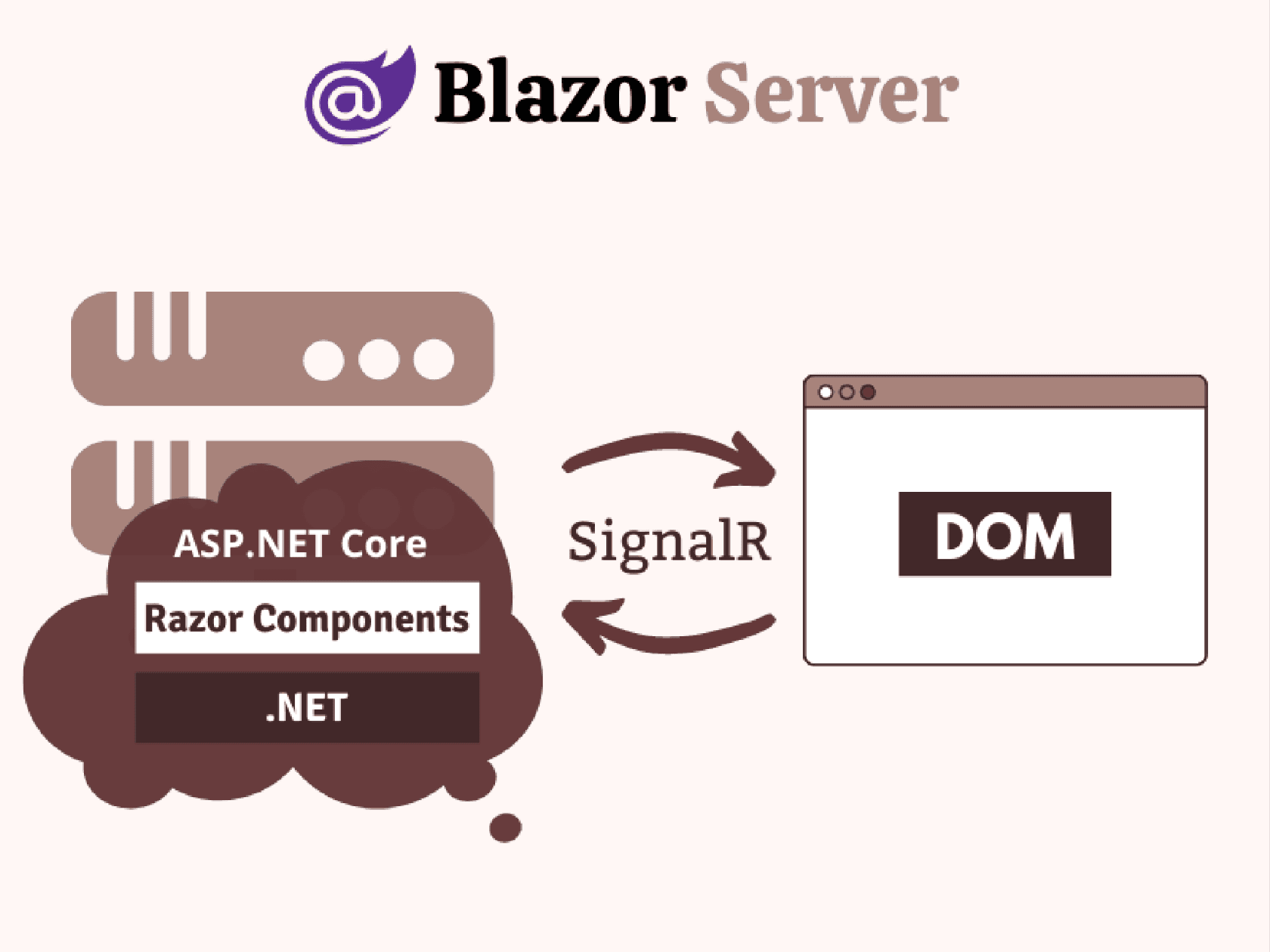
Blazor Server is a hosting model that executes components on the server from within an ASP.NET Core app. Here’s how it works:
UI updates, event handling, and JS calls are handled over a SignalR connection using the WebSockets protocol
The state on the server associated with each connected client is called a circuit
Circuits aren’t tied to a specific network connection and can tolerate temporary network interruptions
What is SignalR? SignalR is a powerful library developed by Microsoft that seamlessly incorporates real-time functionality into applications. It allows you to push content from the server to connected clients in real-time.
Benefits of using Blazor Server:
Download size is significantly smaller than Blazor WebAssembly
The app loads much faster
The app takes full advantage of server capabilities, including .NET Core APIs
.NET/C# code base isn’t served to clients
Limitations of Blazor Server:
Higher latency usually exists
No offline support
Scaling apps with many users requires server resources
Note : Latency still a major problem of Blazor Server. Client is tied to the server with a webSocket protocol which bring into question the scalability of Blazor server App (virtual DOM management for each client need importante CPU, Storage and Network resources)
2. Blazor WebAssembly Server
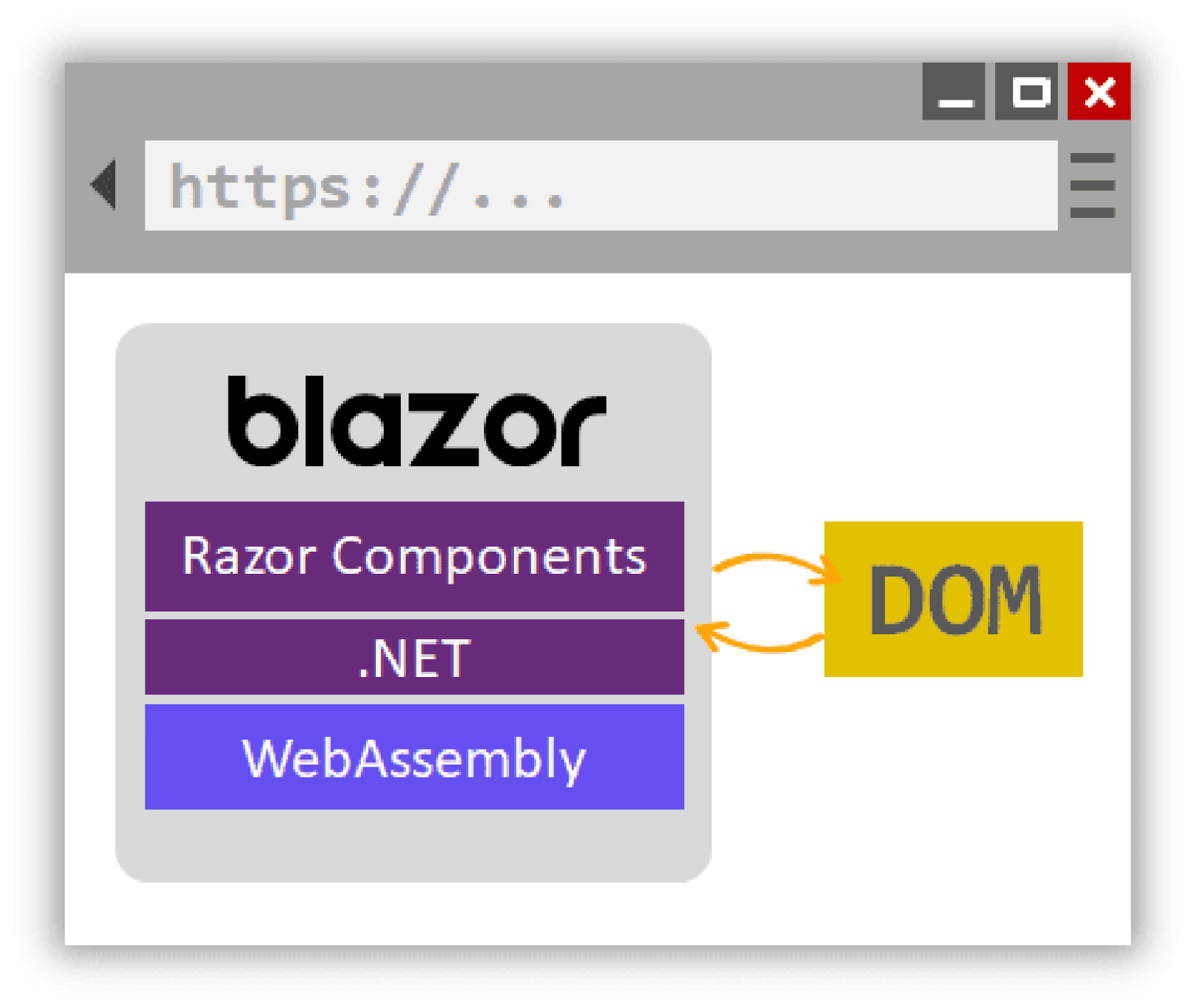
Blazor WebAssembly Server runs components client-side in the browser on a WebAssembly-based .NET runtime. Here’s how it works:
Razor components, their dependencies, and the .NET runtime are downloaded to the browser
Components are executed directly on the browser UI thread
UI updates and event handling occur within the same process
Assets are deployed as static files to a web server or service capable of serving static content to clients
Blazor provides various hosting models tailored to different application requirements, making it essential to choose the right one for your project. You’ve already learned about the first model, Blazor WebAssembly. The second model is the Blazor Hybrid.
Blazor Hybrid: This model combines the strengths of Blazor with native client frameworks, enabling the development of robust cross-platform desktop and mobile applications using C# and Razor components. It’s particularly well-suited for building applications that need to run on both desktop and mobile platforms.
Where can I learn more?
Here are some valuable resources to continue your Blazor journey:
Thank you for reading! I hope this introduction to Blazor has been helpful. Stay tuned for upcoming articles where we’ll dive deeper into Blazor WebAssembly and other related topics. If you have any questions or need further clarification, feel free to leave a comment or reach out.
Happy coding!